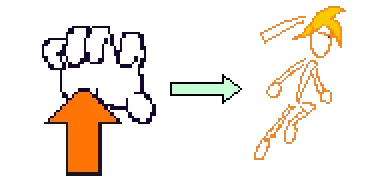
Bow Hand Mechanics
This post is to show the journey of creating the hand - motion tracking feature for my game.
Version 1
I thought this would be a straightforward process. Only two simple motions:
-
Bowing right means moving your hand to the right (right swipe). This triggers the orange character to attack right.
-
Raising your fingers means curling up your fingers. Orange character jumps.
My computer told me otherwise.
- Core Architecture
[ STEP 1: OpenCV/MediaPipe ]
       Captures Camera Frame
                 │
                 ▼
       Checks Rules & Thresholds
                 │
                 ▼
 [ STEP 2: Network Sender ]
       Fires UDP Packet (e.g., b"jump") ───► Local Computer Network (Port 5005)
                                                             │
 ┌───────────────────────────────────────────────────────────┘
 │
 ▼
 [ STEP 3: Background Listener ]
       Runs continuously on a background thread
       Catches the packet ──► Appends Timestamp to Deque Queue (e.g., jump_events)
                                                             │
 ┌───────────────────────────────────────────────────────────┘
 │
 ▼
 [ STEP 4: Game Execution ]
       Main Loop ticks every frame ───► Checks if queue has an event
                                                    │
                                                    ▼
                                      Triggers character animation!
Example Use Case
Step 1
- User moves their hand to the right
- OpenCV detects the movement as “right swipe” per rules/thresholds.
Step 2
- Window with OpenCV screen packs the identified right swipe action into a network packet labelled with text data b”right attack”.
- Packet gets sent across the computer network over some port number (ex. port 5005).
Step 3
- The listener catches the b”right attack” packet the moment it arrives.
- It notes the exact time you did it and adds that timestamp into a Deque Queue.
Step 4
- Main program checks the Deque Queue and extracts the right attack event. From there, it carries out the respective function for the orange character to do the right attack.
- Allow user to curl up fingers and swipe hand right anywhere on the camera screen
From this, I tracked the fingertips and their position in space by marking them with blue dots. If at least one of those dots moved from one starting x- position to a differenet x-position in a line under a certain duration, it is considered as a right-swipe.
Same pattern applied for the jump. If at least one of those dots moved from one lower starting y- position to a different, higher y-position in a line under a certain duration, it is considered as a jump.
Problem: Game Engine confused between character actions.
a) Lack of Boundaries in Physical Space
The python script in charge to identifying whether a hand motion was a right swipe or if the fingers were curling up could not discern between the two. This results in a logic error.
b) No Cool-Down for Jumps
If a jump is triggered, the opencv server I made in the python script processess other inputs after the jump. What this means is that while the character is mid-jump, it can also trigger the character to do additional actions such as attack in mid air which is not what it should do.
Version 2
Feature: The Jump Line and Jump Timer
Improvement: Prevent logic errors between “jump” and “right attack” from hand motions. Now this allows each command to be distinct from each other.
a) Jump Line
“Jump” - triggered by raise fingertips starting below the line to some spot above the line.
“Right Attack” - triggered by moving fingertips to the right below the line under a certain amount of time. This timing prevents unintentional hand movements to trigger a “right attack”.
Problem: Users were not properly positioning their hands as intended.
The game’s functionality made complete sense to me since I am the one making it. But when having other people try out a demo version of my game, their interpretations of carrying out the motion for “jump” varied. The main theme was that everyone moved their hand in various (and sometimes bizarre) ways. This made me realize that I had to be strict about defining how each fingertip should be positioned during different stages of the hand movement for the respective character action.
b) Jump timer
After triggering the finger motions for “jump”, a red transparent layer shows below the jump line for some period of time before disappearing. This prevents multiple hand motions from triggering multiple actions concurrently to reuslt in a buggy output in the character’s motions. No problems from adding this feature observed.
Version 3 (Current)
Feature: Multiple Mediapipe landmark checks
Improvement: Two Safeguards pertaining to finger positioning to ensure proper bow hand mechanics
Hand-to-Wrist Proximity
- Index knuckle (landmark 10), middle knuckle (landmark 11), or ring fingertip (landmark 12) must appear above the horizontal jump line during the raising part of the full hand motion.
Gesture Alignment and Consistency
- Index knuckle (landmark 10), middle knuckle (landmark 11), or ring fingertip (landmark 12) must be in line with each other throughout the whole finger raise motion to trigger “jump”. This ensures users focus on the hand-wrist motions instead of moving with their whole arm.
Extension Thresholds
- The distance between the ring fingertip (12) and the base of the thumb/wrist area (1) must be at least some minimum value. This prevents allowing a closed/collapsed hand from satisfying the reset as the hand must be in a relaxed, partially open form (resembling that as holding a violin bow).
Distance Monitoring
- The system calculates the physical pixel distance between the ring fingertip (12) and the ring finger knuckle (9). This prevents allowing a closed/collapsed hand from satisfying the reset as the hand must be in a relaxed, partially open form (resembling that as holding a violin bow).
Proper Arm Positioning
- For “right attack” to trigger, the elbow must be present on the screen. This is to encourage proper bowing posture as students tend to drop their arm when bowing.